Built by @crmne on GitHub. This page was written by @iluxav from public sources, last updated for v2.7.0 (2026-09-30), and may lag behind new releases.
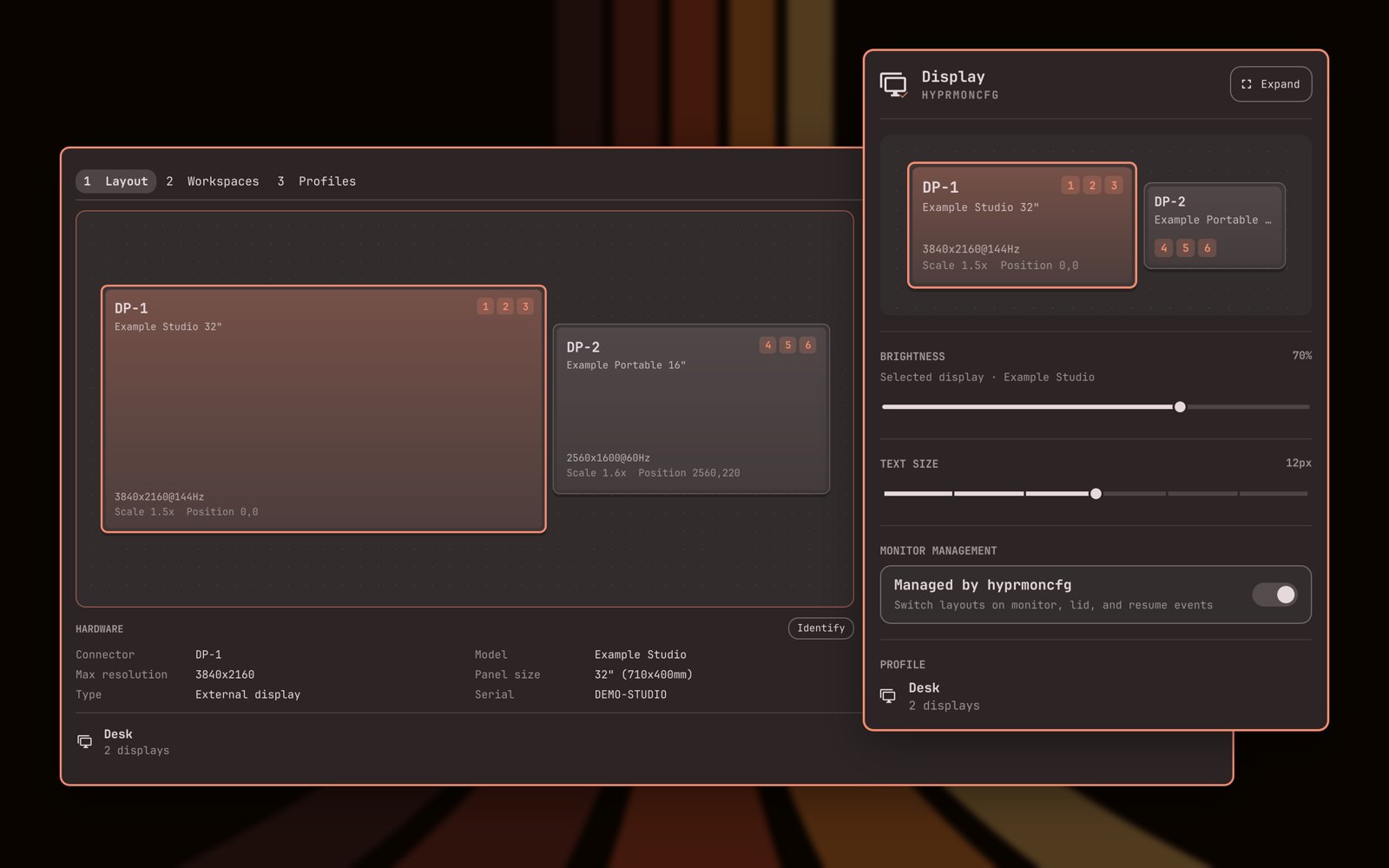
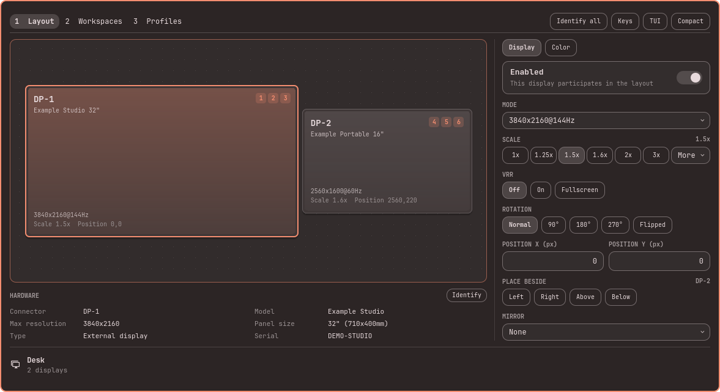
Arrange your monitors in a visual editor in the Omarchy bar, save a profile per setup, and have the right layout applied when you plug in displays or close the lid.
What you can do with it
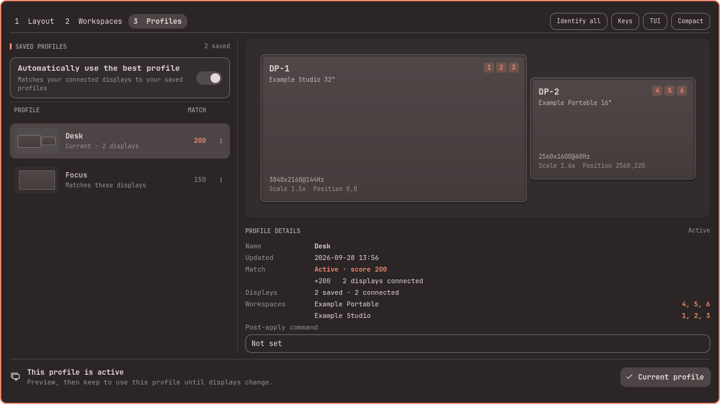
Apply the saved monitor profile that matches the connected displays automatically on hotplug and lid events.
Good to know
Needs the hyprmoncfg package and its hyprmoncfgd user service.
Since v1.1.5
See the live arrangement of your monitors and which profile is active from the Omarchy bar.
Since v1.1.5
Install or update hyprmoncfg and restart its service from the panel.
Since v1.1.5
Drag monitors into place and set each one's mode, scale, rotation, VRR and mirroring in a visual editor, then preview and keep or revert.
Since v2.0.1
Change the brightness of each display from the panel.
Good to know
Uses Omarchy's backlight, DDC/CI and Apple Display support; not stored in profiles.
Since v2.0.1
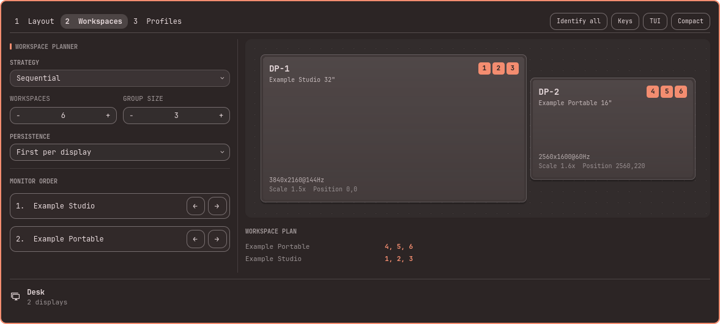
Decide which Hyprland workspaces open on which monitor.
Since v2.0.1
See which displays are on but show no picture, and which run below their saved mode.
Good to know
The stepped-down note needs hyprmoncfg 1.21.0; it does not say whether recovery is in progress.
Since v2.7.0
Change the desktop text size from the panel, as in Omarchy's Display panel.
Good to know
Needs Omarchy's omarchy-display-text-size; applies to every display and is not saved in profiles.
Since v2.7.0
Before you upgrade
Newest first
v2.4.12026-09-26
The editor's 2 and 3 shortcuts swapped: 2 is now Workspaces, 3 Profiles.
Behavior changedAffects: Users who navigate the editor with number keys
See which displays are on but show nothing, or run below their saved settings.
Details
v2.5.0 marks displays with No usable signal and shows when hyprmoncfg stepped a display down (needs hyprmoncfg 1.21.0). v2.6.0 redraws the layout as lit screens, sizes the panel to its content, adds scale pills, Place beside and layout thumbnails on profiles. v2.7.0 adds Omarchy's Text size slider under Brightness.
Also: Workspace numbers animate between displays when the plan changes; the compact view scrolls when taller than the screen.
Added: See which displays are on but show no picture, and…Improved: Drag monitors into place and set each one's mode, s…Added: Change the desktop text size from the panel, as in…
Try a saved profile with a 30-second preview without turning automatic selection off first.
Details
Redesigned editor with pages 1 Layout, 2 Workspaces, 3 Profiles (2 and 3 swapped), profile menus on right-click or Shift+F10 with confirmed deletion, off and mirrored displays as selectable cards. v2.4.1 adds Strategy Off to stop hyprmoncfg writing workspace rules. Requires hyprmoncfg 1.19.0. Groups v2.4.0-rc.1, v2.4.0 and v2.4.1.
v2.4.1; needs hyprmoncfg 1.19.0 or newer.
Improved: Apply the saved monitor profile that matches the co…Improved: Decide which Hyprland workspaces open on which moni…Behavior changedAction required
Reset single fields of a loaded profile back to their defaults.
Details
Per-field resets on the loaded profile; colour settings use display-standard colour-space and EOTF terms; previews survive monitor rebuilds. Requires hyprmoncfg 1.18.2. From v2.3.4 the panel no longer updates itself; updates come through Omarchy's plugin marketplace. v2.3.5 fixes previews on Omarchy 4.0.3.
v2.3.5; needs hyprmoncfg 1.18.2 or newer.
Improved: Drag monitors into place and set each one's mode, s…Action requiredAction requiredBehavior changedNow works: Drag monitors into place and set each one's mode, s…
Drive the panel with the same keys as the hyprmoncfg TUI.
Details
The expanded panel mirrors the TUI shortcuts (page keys, a applies, s saves, r resets, ? shows keys; arrows move a display). A fresh machine gets the prebuilt hyprmoncfg-bin package. Groups v2.1.0 to v2.1.4.
v2.1.4.
Improved: Drag monitors into place and set each one's mode, s…Improved: Install or update hyprmoncfg and restart its servic…
Arrange and configure your monitors in the bar panel itself, without opening the TUI.
Details
v2.0.0 turns the panel into a full display manager: a compact view with per-display brightness and a draggable layout, and an expanded editor for layout, saved profiles and workspace planning, with per-monitor mode, scale, rotation, position, enabled, VRR and mirroring, and preview, keep and revert. Requires hyprmoncfg 1.16.0.
v2.0.1; needs hyprmoncfg 1.16.0 or newer.
Added: Drag monitors into place and set each one's mode, s…Added: Change the brightness of each display from the pane…Added: Decide which Hyprland workspaces open on which moni…Improved: Apply the saved monitor profile that matches the co…Action required
See your monitor layout and active profile in the Omarchy bar, and have profiles switch on their own when you plug in displays or close the lid.
Details
First releases (v1.1.0 to v1.1.5): an Omarchy bar panel for hyprmoncfg with the live spatial layout, the active profile, automatic switching through the hyprmoncfgd user service, and an Install hyprmoncfg button that installs the AUR package in Omarchy's terminal. The panel offers Restart daemon when the running daemon is older than the installed one.
omarchy plugin add https://github.com/crmne/omarchy-hyprmoncfg.git --enable; needs Omarchy with third-party shell plugins and hyprmoncfg 1.12.0 or newer.
Added: Apply the saved monitor profile that matches the co…Added: See the live arrangement of your monitors and which…Added: Install or update hyprmoncfg and restart its servic…